Posts

Want to automate file downloads like a pro? Discover how to use PowerShell’s

Image
🚀 Want to automate file downloads like a pro? Discover how to use PowerShell’s Invoke-WebRequest to grab multiple files from any website—perfect for scheduled updates or batch downloads.  Need to download dozens of files from a site without lifting a finger? Learn how to automate it with PowerShell’s Invoke-WebRequest cmdlet. I walk you through a script that fetches .exe files and saves them locally - customizable for any file type or URL. Read the full tutorial on Tech That Works. Check out the full guide and script on  Tech That Works

Scan your network with PowerShell

Image
 I recently came across this cool script on LinkedIn that let you scan your network for devices with open ports. This is normally something that requires 3. party tool software that you might not be keen to install in your server. With this tool you can scan your network with a PowerShell script. How to run this Script Copy the script below to PowerShell ISE or save it as a script. Change the $localIP variable to your own IP address and your are ready to go. Clear # if you dont specify IP Address here, the script will get automatically address from network card with DHCP attribute $localIP = '192.168.1.10' # Obtain the IP address of the local machine if($localIP -eq '') {      $localIP = (Get-NetIPAddress | Where-Object { $_.AddressFamily -eq 'IPv4' -and $_.PrefixOrigin -eq 'Dhcp' }).IPAddress } # List of common ports to be scanned $portsToScan = @(20,21,22,23,25,53,80,110,123,143,161,443,445,993,995,3306,3389,5900,8080) # Extract the first three bytes ...

Use ChatGPT to write PowerShell Scripts

Image
 Did you know that ChatGPT can help you to write PowerShell scripts? You properly have heard about ChatGPT, but did you knew that ChatGPT can help you write PowerShell scripts? Asking ChatGPT for a script to perform a simple task Let me show you a little example how you can ask ChatGPT for help creating a script: The result from ChatGTP: It is actually that simple. I have used PowerShell to help me with scripts that can do all kind of stuff. I have asked about scripts to pull out date from Active Directory and how to export Windows Firewall rules. It is not that I can't write the script myself, but it is much faster with ChatGPT. Often I use AI to write like the main idea for my script and then I make some small adjustments myself. Go ahead and see how fast and easy it is. 

Use PowerShell to Discover Network Switch and port number

Image
 If you are working with Networks, that I am, you can sometimes have trouble to find out what switch port a computer is connected to. That can be because of bad marking of a network socket or because a cable simply just disappear into a wall and you are not able to follow it all the way to the rack cabinet. Let me show you an easy way to discover not just port number, but also name of the switch and VLAN for the connection. You will have to run the script below as an administrator, in order for it to work. Script: # Is Module installed - install if not available. if (Get-Module -ListAvailable -Name PSDiscoveryProtocol) {   Import-Module PSDiscoveryProtocol } else {   Install-Module -Name PSDiscoveryProtocol -Force   Import-Module PSDiscoveryProtocol } $Packet = Invoke-DiscoveryProtocolCapture -Type LLDP Get-DiscoveryProtocolData -Packet $Packet Be aware that you will need to have a manage lager 3 switch,  for the LLDP protocol,  to collect these information...

How to get Public IP Using PowerShell

Image
How to Get My Public IP Address Using PowerShell If you want find your public IP address that are being logged when you communicate on the Internet you can use a website like: ipconfig.me   But what if you want to get it using a PowerShell script? That is in fact also possible by using the command: Invoke-WebRequest. PowerShell command to get your Public IP Address: (Invoke-WebRequest -uri "http://ifconfig.me/ip").Content Or (Invoke-WebRequest -uri "https://techthatworks.net/publicIP.php").Content This one line command can be very useful if you need the public IP address of a server without a webbrowser installed. E.g. a mailserver where you need to find out what IP address your server is presenting for other mailservers on the Internet. If you want to use this command in a script that maybe write something to a logfile, you can put the IP adresse in a variable and use it inside your script. $MyPublicIP = (Invoke-WebRequest -uri "http://ifconfig.me/ip")....

PowerShell 7.2 is now available for Download

Image
 Great news, PowerShell 7.2 is now avilable for public download. Get PowerShell 7.2 here What is new with PowerShell 7.2 With PowerShell 7.2 there is integration with Microsoft Update, meaning that you installation of PowerShell in the future will be updated via Windows Update with new critical bug fixes or security updates. Enhanced ANSI support PowerShell 7.2 now has Enhanced ANSI support. With ANSI escape sequences, an industry standard way to provide text decoration support between console and a supported terminal. Use of these decorations is a way for commend-line tools and shells to highlight or distinguish information. You might also want to check out the built-in variable called $PSStyle to make your own decoration for your scripts. More information about PowerShell 7.2

Hyper-V PowerShell Commands

Image
If you are running Hyper-V virtual machine you might find this post interesting. There is plenty of PowerShell Cmdlets for managing a Hyper-v environments. Hyper-V Cmdlets In this post I will cover some of the most simple Cmd-Lets you can use to manage your Hyper-V environments. Get-VM: Shows a list of Virtual machines running on your server, with current state and Uptime. Start-VM: Start a given Virtual machine from PowerShell. Stop-VM: Shutdown or turn off a selected VM Save-VM: Save the state of the virtual machine Checkpoint-VM: Creates a Checkpoint for a given VM that you can restore to, if something goes wrong.  Get-VMSnapshot: Get a list of snapshots for given VM. Get-VM In the example below we use Get-VM to get a list of all the Virtual machines running on this server and the current state of these machines: Start-VM In the example below I start the Virtual machine named "Windows 11: Stop-VM In the example below I stop the virtual machine named "Windows 11"...

Download PowerShell 7.1

Image
Have you downloaded PowerShell version 7.1? If not I will tell you how you can do it. Windows 10 comes with PowerShell 5.1 and Windows 11 comes with a minor upgrade. If you want to get the power of PowerShell 11 you will have to download and install it your self. It is not a part of Windows Updates. Windows 10: Windows 11: Download PowerShell 7.1 To download PowerShell 7.1 go to the official page on docs.microsoft.com  The package is available in both x86 and x64 bit version and also in .msi package and as a .zip file. That this site you will find all the information you will about PowerShell 7.1 Installation of PowerShell 7.1 Installation is straightforward. Just click, next, next next and you are ready to go: Be aware that the built in PowerShell that comes with Windows still will be the default PowerShell version. To start PowerShell 7, just search after PowerShell 7 in the Windows Start menu.

How to Search EventLog Using PowerShell

Image
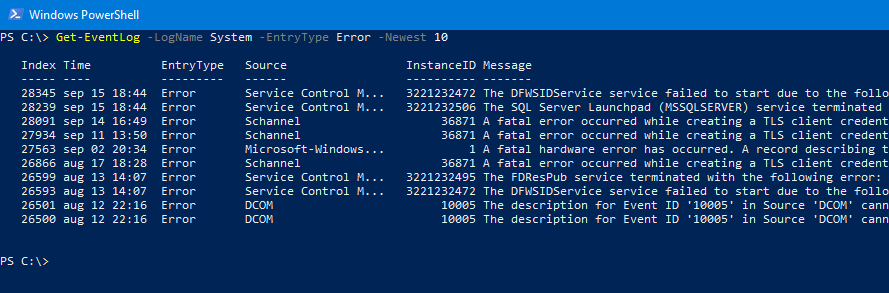
In this post I will show you some tips on how you can search your computers EventLog using PowerShell. This can be very powerful if you need to search for e.g. a specifik error in the EventLog.  Basic Get-EventLog command The basic command is like shown below. Get-EventLog -LogName System If you want to you can filter using the parameter -EntryType to see only e.g. Errors in the eventlog: Get-EventLog -LogName System -EntryType Error In order to only see the newest 10 error you can enter the command below: Get-EventLog -LogName System -EntryType Error -Newest 10 Run Get-EventLog on Remote computer In order to check the EventLog on a remote computer you will have to use the Invoke command as shown below: All you need to do is to replace localhost with the name of the remote computer, where you want to run the command. For more information about the PowerShell Get-EventLog cmd-let check out Microsoft docs

How to download a file using PowerShell?

Image
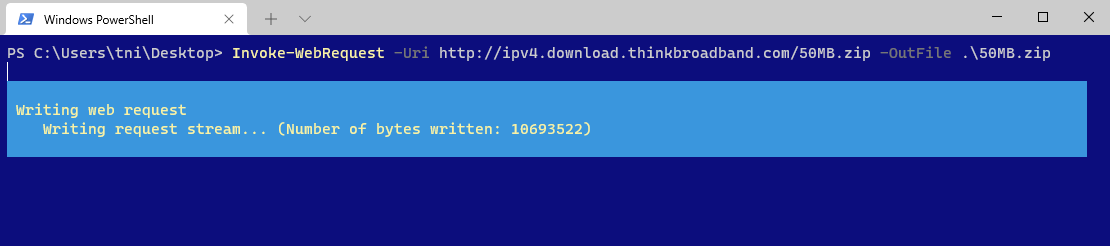
Today I came across a nice and simple command for downloading files from the web. It is very simple but also very powerful. Command:   Invoke-WebRequest -Uri http://ipv4.download.thinkbroadband.com/50MB.zip -OutFile .\50MB.zip What this command does is, downloading a 50 MB test file from thinkbroadband.com to your own computer and put it in your current path. In this example on my Desktop. You can of cause easily change both the url for the file you want to download and the target location changing the -Outfile parameter. Lets say you want to download a file every day and name the file with day of the day, you can use the following two commands: $filename = Get-Date -Format "dd-MM" Invoke-WebRequest -Uri http://212.183.159.230/200MB.zip -OutFile .\$filename.zip

How to check if your computer have a TPM chip

Image
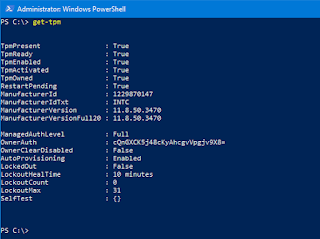
How to detect a TPM chip using PowerShell Microsoft have stated that a TPM chip will be a hardware requirement for running Windows 11 . To help you detect if your computer is compliant with that I would like to share a script for just that. Be aware that not just your computer need a TPM chip. It also has to be a version 2.0 chip. Get-Tpm command can help you detect if you have a TPM chip in your computer. In order to detect of your computers TPM chip is version 2.0 you can run the following command: Get-WMIObject -computer localhost -class Win32_Tpm -Namespace root\cimv2\Security\MicrosoftTpm  | select PsComputerName,SpecVersion,manufacturerVersion,manufactureridtxt | fl If the first command state that TPMPresent is False, you might want to check if it is because the chip has just been disabled in BIOS/UEFI. That was the case on my computer. Check the manual of your motherboard. It might not be called TPM in your BIOS/UEFI settings. Here is an example:  

How to Install Windows Terminal on Windows Server 2022

Image
How to Install Windows Terminal on Windows Server 2022 Recently I wrote a post about Windows Terminal . At that point it was only possible to install the app on windows 10. That was until i visit the blog of Thomas Maurer. Thomas is a Senior Cloud Advocate at Microsoft and have a great blog you should check out. Here you can learn how to install it on Windows Server 2022.

Windows Terminal for Windows 10

Image
Wouldn't it be great if there was a way to use tabs in PowerShell and command prompt in stead of having 100 small console windows open? Do you also feel that it would be nice to customize your favorite console in more ways that it is today? Well it is actually possible with Windows Terminal for Windows 10. I have written an article about it over at TechThatWorks. Go ahead and check it out .

How to use PowerShell Speech Commands

Image
 As I mention earlier on , here on this blog, I recently came across an interesting blogpost about PowerShell being able to read text using Speech cmd-lets.

Powershell text to speech

Image
I just came across this great post the other day about PowerShell text to Speech cmdlets. I was not even aware that it was possible to make PowerShell read up text for you. Check it out using the link below. https://thesysadminchannel.com/powershell-text-to-speech-how-to-guide

Welcome to my PowerShell-Works blog

Welcome to my PowerShell-Works blog On this blog I will share some of my greatest resources for PowerShell scripting. With PowerShell you can do almost everything on a Windows device. Here is a little to get you startet. PowerShell Documentation - PowerShell | Microsoft Docs PowerShell Team | Automating the world one-liner at a time… (microsoft.com) How to get AD Password Age with PowerShell How to collect System Information using PowerShell How to move Hyper-v Storage location using Powershell How to use PowerShell Speech commands You can also check out my main blog TechThatWorks

Popular posts from this blog

Use PowerShell to Discover Network Switch and port number

Use ChatGPT to write PowerShell Scripts

Hyper-V PowerShell Commands